

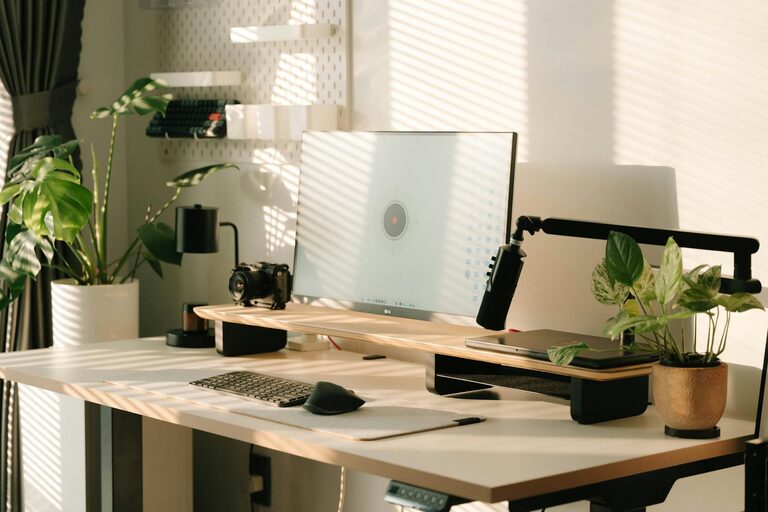
Creating a comfortable and efficient home office environment is essential for maintaining productivity and focus while working remotely. Whether you are new to working from home or have been doing it for years, a well-designed workspace can make a significant difference in your daily performance and overall well-being. In this post, we’ll explore practical tips and ideas to help you set up a productive home office tailored to your needs.
Why a Dedicated Home Office Space Matters
When working from home, it’s important to have a dedicated space that separates your professional and personal life. A specific area for work helps you mentally switch into “work mode,” reducing distractions and improving concentration. Even if you have limited space, carving out a designated corner or desk for work purposes can increase your productivity significantly.
Key Elements of a Productive Home Office
Before diving into the setup, let’s look at the essential components of an ideal home office:
– Comfortable seating: Ergonomic chairs support proper posture and prevent discomfort during long working hours.
– Adequate lighting: Both natural and artificial light contribute to a pleasant atmosphere that reduces eye strain.
– Organised storage: Keeping your desk clutter-free with shelves or drawers allows for better focus.
– Technology setup: Reliable internet, quality computer equipment, and accessories facilitate smooth work.
– Personal touches: Adding plants, artwork, or décor can make your workspace inviting and motivating.
Step-by-Step Tips for Setting Up Your Home Office
1. Choose the Right Location
Pick a quiet spot in your home away from high-traffic areas. If possible, select a room with natural light. This reduces eye fatigue and boosts mood. If you do not have a separate room, use room dividers or noise-cancelling headphones to create boundaries.
2. Invest in Ergonomic Furniture
Comfort is key to sustaining long hours of work. An ergonomic office chair with adjustable height and lumbar support prevents back pain. Pair it with a desk at the right height for your body, allowing you to keep your arms at a 90-degree angle while typing.
3. Optimize Lighting
Natural daylight helps regulate your body clock, making you feel more alert. Position your desk near a window but avoid glare on your screen. Complement natural light with adjustable desk lamps or LED lights that reduce eye strain, especially during evening hours.
4. Keep Your Desk Organised
Clutter can hinder your ability to focus. Use desk organisers, trays, and drawers to store stationery and important documents. Regularly clear out unnecessary items. Digital organisation tools can also help reduce physical clutter.
5. Set Up Reliable Technology
Ensure your internet connection is fast and stable to avoid interruptions during meetings or tasks. Invest in a good-quality headset or microphone for clear communication. Multiple monitors or an adjustable laptop stand can improve comfort and efficiency.
6. Manage Noise and Distractions
Minimise potential disruptions by informing family or housemates about your working hours. Use noise-cancelling headphones or white noise machines if external noise is unavoidable. Turning off non-essential notifications on your devices also helps maintain focus.
7. Incorporate Personal Comfort and Style
Adding a few personal items like plants, pictures, or inspirational quotes can make your workspace more inviting and reduce stress. Plants, in particular, improve air quality and add a touch of nature that can uplift your mood.
8. Establish a Routine
Having a consistent work schedule helps structure your day and creates boundaries between work and leisure. Include breaks and stretch regularly to avoid fatigue. Consider techniques like the Pomodoro method to balance focused work with rest.
9. Utilize Productivity Tools
Digital calendars, task management apps, and focus timers can help keep track of deadlines and priorities. Explore tools that fit your workflow and reduce the time spent on administrative tasks.
Maintaining Your Home Office for Continued Productivity
Once your workspace is set up, maintaining it is just as important:
– Regularly declutter to keep distractions to a minimum.
– Adjust your setup as needed to improve comfort or efficiency.
– Review your routine periodically to address any productivity challenges.
– Stay connected with colleagues through virtual meetings or chats to reduce feelings of isolation.
Conclusion
Creating a productive home office environment is a blend of thoughtful design, technology, and personal habits. By focusing on comfort, organisation, lighting, and minimising distractions, you set yourself up for success in your work-from-home journey. Small changes can lead to significant improvements in focus and satisfaction during your workday.
We hope these tips help you build a home office space where you can work comfortably and effectively. Happy working!